
Receipt Maker
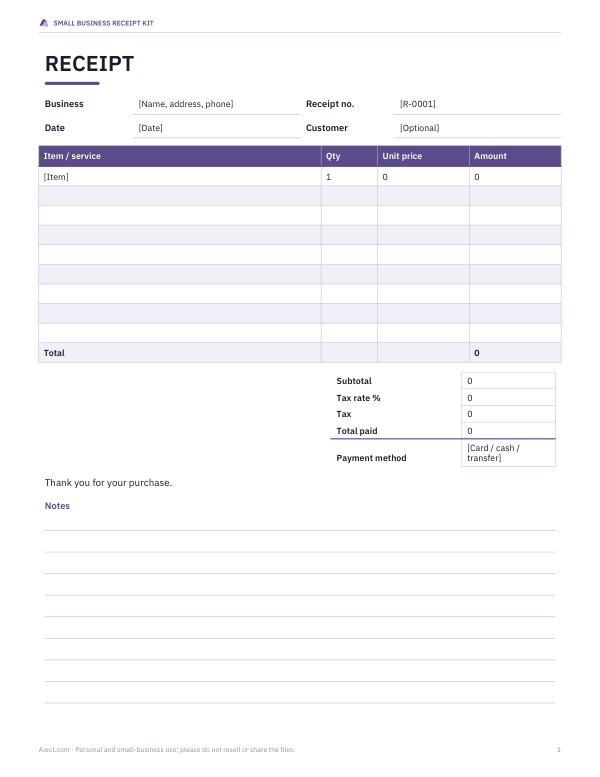
Create a professional receipt for a sale in under a minute. Add your business name, the customer, each item with quantity and price, tax and the payment method; the receipt totals itself and prints as a full page or a narrow till-style slip.
- Free to use
- No sign-up
- Runs in your browser
Make a receipt
| Item | Qty | Price | Amount |
|---|
Small Business Receipt Kit
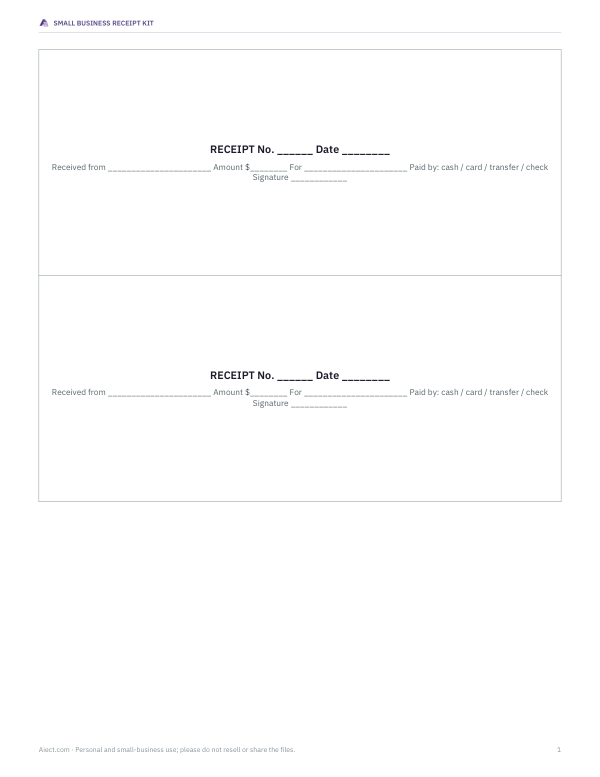
Editable receipt templates in Word and Excel (with automatic totals), a numbered receipt book to print, and a sales record workbook.
- Sales receipt (XLSX, DOCX, PDF)
- Printable receipt book, 3 per page (PDF, DOCX)
- Sales record workbook (XLSX)
Formats: XLSX, DOCX, PDF. Instant download after payment (link valid 72 hours, up to 5 downloads). AI-assisted: the templates were drafted with AI help and reviewed and laid out before publishing.
$5.00 USD, one-time 3 files · about $1.67 each
- Instant download
- 7-day refund
- Secure checkout by Stripe
7-day money-back guarantee. Full refund within 7 days of purchase, even after you download.
Full refund within 7 days — see the refund policy and license.
Free printables
Single sheets you can print right now, no sign-up. The full pack adds every sheet in one download plus the editable files.
Who this receipt maker is for
Market stallholders, craft sellers, tutors, cleaners, freelancers, small shops without a point-of-sale system and anyone who sells occasionally need to give customers a proof of payment. This tool produces a tidy receipt from the details of a real sale — your business, the items, the amount paid and how it was paid — ready to print, email as a PDF or hand over at the till.
Receipts must describe genuine transactions. Creating a receipt for a sale that did not happen, or altering amounts or dates, is fraud in most places, and this tool is not for that. Keep a copy of every receipt you issue as part of your business records.
What to include on a receipt
- Your business name and contact details — address, phone or email.
- A unique receipt number, following a sequence.
- The date of the sale (and time if useful).
- Each item or service with quantity and price.
- Subtotal, any tax charged and the total paid.
- The payment method: cash, card, bank transfer, check or mobile payment.
- Optional: the customer's name, a return policy, or a thank-you note.
If you are registered for sales tax, VAT or GST, local rules may require extra details such as your tax registration number or a breakdown of tax by rate. Check the requirements for your location; the tool shows tax as a single rate on the subtotal.
Receipt versus invoice
An invoice asks for payment; a receipt confirms that payment has been received. If you bill a client before they pay, send an invoice first and then a receipt, or mark the invoice “paid”. For on-the-spot sales — a market stall, a lesson paid in cash — a receipt alone is usually enough. Some customers need a receipt to claim expenses from their employer or for their own tax records, so offering one builds trust.
Full page or till slip?
“Full page” prints a clean receipt on Letter or A4 paper, ideal for emailing as PDF or giving to a customer who needs it for expenses. “Narrow slip” mimics a till receipt about 80 mm wide in a monospaced font; print it on a thermal receipt printer set to 80 mm paper, or on regular paper and trim it. In the print dialog, choose “Save as PDF” to email the receipt instead.
Worked example
A potter sells two handmade mugs at $18 each and gift wrapping for $3.50 at a weekend market. The subtotal is $39.50. In a state where 6% sales tax applies to the sale, tax is $2.37 and the total $41.87, paid by card. The receipt shows the business name and address, receipt R-00125, the date, both lines, the subtotal, tax, total and “Paid by card”, with a thank-you note at the bottom.
Record-keeping tips
- Number receipts consecutively and never reuse numbers — gaps and duplicates raise questions in an audit.
- Save a PDF of every receipt, or print two and keep one, in a folder by month.
- Match receipts to your bank deposits and card processor statements each week.
- Keep records for as long as your tax authority requires; in the US the IRS generally recommends at least three years, longer in some cases.
- Use the same business name on receipts as on your bank account and tax registration.
Cash sales and change
For cash sales, some sellers note the amount tendered and the change given, which helps reconcile the cash box at the end of the day. You can add a line such as “Cash tendered $50.00, change $8.13” to the footer note. Counting the float before and after each market day and comparing it with the day's receipts is the simplest way to catch mistakes.
Receipts for services and appointments
For services such as tutoring, cleaning or repairs, describe the work and the date it was carried out rather than just the price: “Piano lesson, 60 minutes, 12 May” is more useful to a customer claiming expenses than “Lesson”. If a customer pays in advance for a package of sessions, list the package and the number of sessions included. When a customer pays several invoices at once, a single receipt can list each invoice number and amount so both of you can match it to your records.
Privacy
The receipt is created in your browser. Business and customer details are not uploaded or stored, and they disappear when you close the page. Save a PDF if you need a copy.
Frequently asked questions
Is this receipt maker free?
Yes. Create and print as many receipts as you need for real sales.
Can I add my logo?
The free receipt uses a text header. The Word and Excel templates in the paid pack include space for a logo.
Can I email the receipt?
Print to PDF using “Save as PDF” in the print dialog, then attach the PDF to an email.
Do I have to charge tax?
That depends on your location, what you sell and whether you are registered. The tool calculates tax only if you enter a rate.
Is my data saved?
No. Nothing is stored; keep your own copy of each receipt.
What paper size does the slip use?
The slip layout is about 72–80 mm wide, the common thermal receipt roll size.
Can I issue a receipt for a deposit?
Yes. Describe the line as a deposit, for example “Deposit for custom order #12”, and issue a final receipt for the balance when it is paid.
How should I number receipts?
Use a simple sequence with a prefix, such as R-00001, and keep going across the year. Never reuse a number, even if a receipt is voided; mark voided receipts instead.
Can I give a receipt for a refund?
Issue a separate refund note showing the original receipt number, the amount refunded and how it was paid back, rather than editing the original receipt.